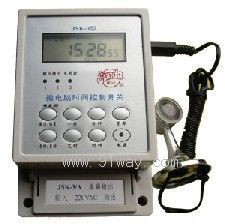
The JSK-3 microcomputer time control switch can automatically turn on and off the power of various electrical equipment according to the user's set time. The controlled objects can be street lamps, neon lights, advertising sign lights, production equipment, broadcasting and television equipment, and all electrical and household appliances that need to be turned on and off at regular intervals.
JSK-3 microcomputer time control switch can be customized according to user requirements for 12V, 24V, 36V AC/DC working products. Conventional products do not have light controlled rain control probes, which can be installed according to requirements. The product model for installing light control probes is JSK-3/G, and the product model for installing rain control probes is JSK-3/Y.
2、 Main technical indicators:
Applicable power range: 160-240VAC, 50/60/Hz Timing error: < ± 2 seconds/day
Single switch capacity: resistive 20A inductive 16A dual switch capacity: 2 × 5A
Relative humidity:<95% Environmental temperature: -10 to+60 ℃
Time control range: 1 minute to 168 hours Power consumption:<1VA
There are 10 sets of switch times, both manual and automatic. Weight: 365 grams
3、 Instructions for use:
Clock status setting/adjustment:
On the clock display interface, hold down the [Clock] key while pressing the [Hour], [Minute], or [Week] keys to adjust the clock or week; Press the [Auto/Manual] button to switch between [On/Auto/Off] states (when pressed to the "On" state, the system will always have output; when pressed to the "Off" state, the system will turn off the output; when pressed to the "Auto" state, the system will execute the set time switch program, and should be placed in the "Auto" position during normal operation).
§ Timer state setting/adjustment:
1. After unlocking the keyboard, press the [Timer] key to enter the timer state. Each time you press the [Timer] key, you will enter the next set of timer settings interface; The JSK-3A model does not have a keyboard lock, while the JSK-3B model has a keyboard lock. The time control switch has an automatic keyboard lock function. To start the operation, long press the "unlock" button for 3 seconds to make the lock icon in the bottom left corner of the screen disappear,
If you press the [Timer] key continuously: 1 on → 1 off → 2 on → 2 off →... 9 on → 9 off → 10 on → 10 off → Clock interface → 1 on → 1 off → 2 on → 2 off →... Repeat the cycle.
2. On the timer setting interface, press the [Hour] key to adjust the hour for the current timer
3. On the timer setting interface, press the [minute] key to adjust the minute of the current timer
4. On the timer setting interface, press the [Week] key to adjust the week setting selection for the current timer; There are 15 week combination modes to choose from for each "on" or "off" setting. By continuously pressing the [week] key, the 15 week combination display can be cycled as follows:
Monday, Tuesday, Wednesday, Thursday, Friday, Saturday, Sunday, Monday, Tuesday, Wednesday, Thursday, Friday, Saturday, Sunday, Friday, Friday, Friday, Friday, Friday, Friday, Friday, Friday, Friday, Friday, Friday, Friday, Friday, Friday, Friday, Friday, Friday, Friday, Friday, Friday, Friday, Friday, Friday, Friday, Friday, Saturday, Sunday, Friday, Friday, Friday, Friday, Friday, Friday, Friday, Friday, Friday, Friday, Friday, Friday, Friday, Friday, Friday, Friday, Friday, Friday, Friday, Friday, Friday.
5. In the timing setting interface, pressing the [Cancel/Restore] button will cancel or restore the set of timing.
6. On the timer setting interface, press the [Clock] key to return to the clock state.
4、 Instructions for using the light controlled rain control probe:
On the right side of the product, there is a light rain control socket and a light intensity adjustment knob. When the light control probe and rain control probe are not plugged in, the usage method is the same as described earlier.
2. Instructions for using the light control: If the switch output is in the on state, plug in the light control probe (the light control plug above and the rain control socket below). If there is light, the light rain control indicator light will turn on and the switch will turn off after about 30 seconds; After no light, the indicator light will turn off, and it will be recognized and restored to its original state after about 30 seconds; If the switch output is in the off state, regardless of whether there is light, the switch will not operate and will remain in the off state.
Adjusting the illuminance knob can change the starting illuminance. Turning it clockwise will decrease the illuminance (start when the light is dim), while turning it counterclockwise will increase the illuminance (start when the light is strong). When adjusting, simply observe the changes in the panel indicator light. When the illumination reaches the control illumination, adjust the knob to make the panel indicator light just turn off. Pay attention to waiting for 30 seconds for the output to change. It should be noted that after adopting light control, the time control switch must be set to on during the time period when light control is required.
3. Rain control usage method: Insert the rain control probe. If the switch output is in the on state, the probe will sense rainwater at this moment. After about 30 seconds of turning on, it will turn off. After about 30 seconds of no rainwater, it will recognize and restore the original state and turn on; If the switch output is in the off state, regardless of whether the probe senses rainwater or not, the switch will not operate and remain in the off state.
4. Simultaneous use of light control and rain control: In any state of light or rain, regardless of whether the switch is in the on or off state, after a delay of 30 seconds, the switch will enter the off state; If there is no light or rain, the timer switch will work according to the original set program.
5. Products with light and rain control function have about one minute of off state output when first turned on.
5、 Wiring method:
1. Wiring for direct control mode
The controlled electrical appliance is single-phase power supply, with power consumption not exceeding the rated capacity of this switch (25A resistive load, 20A inductive load), and can be directly controlled. The wiring method is shown in Figure 1.
2. Wiring of single-phase expansion method
The controlled electrical appliance is powered by single-phase power, but its power consumption exceeds the rated capacity of this switch (25A resistive load, 20A inductive load). Therefore, an AC contactor with a capacity exceeding the power consumption of the appliance is needed to expand its capacity. The wiring method is shown in Figure 2.
3. Wiring of indirect control mode
This controller is powered by single-phase AC or DC 12V (24V). If the controlled appliance is powered by three-phase, an external three-phase AC contactor is required. The coil voltage of the control contactor is the output voltage of this controller, and the wiring method is shown in Figure 3.
|
Specification Model |
terminal |
power control |
load type |
explanation |
| JSK-3A |
six |
3000W |
arbitrary |
JSK-3 is an improved version of JSK-1 |
|
JSK-3B |
six |
2X600W (two channels) |
arbitrary |
|
|
Overall Dimensions |
125 × 82 × 68 millimeters |
Fixed hole size |
68X122 millimeters |

 Your location:Home → low-voltage electrical apparatus → Counter | timer → Time-controlled switch → JSK-3 type microcomputer time control switch

 Zoom in on the image
 Related Products:
 low-voltage circuit breaker
  timer
timer 
 沪公网安备31010702003255号
