
 Your location:Home → low-voltage electrical apparatus → Counter | timer → Time-controlled switch → TB10A(TB1025) microcomputer time control switch
 |
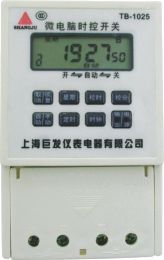
Product name: | TB10A(TB1025) microcomputer time control switch | |||||
| specification: |   Zoom in on the image Zoom in on the image |
||||||
| Category: | low-voltage electrical apparatus -- Time-controlled switch | ||||||
| |
Price: | factory price | |||||
| Brand: | |||||||
| Place of Origin: | China | ||||||
| |
Available Quantity: | batch | |||||
| delivery cycle: | Spot goods (or inquire by telephone) | ||||||
 |
|
||||||
| step | button | Set project |
| one | Press the [Timer] key | Enter the first set of timed on settings (display 1)open) |
| two | Press the [Week], [Hour], and [Minute] keys respectively | Set opening time (week, hour, minute) |
| three | Reinstall the [timer] button | Enter the first set of timed off settings (display 1)close) |
| four | Press the [Week], [Hour], and [Minute] keys respectively | Set the closing time (week, hour, minute) |
| five | Repeat steps 1, 2, 3, and 4 | 2-10 sets of switch times can be set |
| six | Press the [Timer] key continuously | Check if the switch time and week of each group are as required. If they are incorrect, repeat steps 2 and 4 |
| seven | Press the [Auto/Manual] key | Adjust the switch ("▼") to the current state ("on" or "off") and then return it to the "automatic" position |
| eight | Press the [Clock] key | Set the end time to enter the clock display state |
Note: If you do not need to set 10 groups, use the [Cancel/Restore] key to eliminate the excess number of groups. If "--: --" is displayed, it indicates elimination. Pressing the [Cancel/Restore] key again can restore the original time setting before elimination.
Check: Press the [Timer] key continuously to check if the set time and week for each group are correct.
Manual control: Press the [Manual/Auto] button to directly turn on or off the power. When not in the "on" state, keep it on; when in the "off" state, keep it off; When in the "direct action" state, the direct action executes the set time program.
Pressing the [Clock] key or not pressing any key for 30 seconds in a non clock display state can restore the current settings to the clock display state.
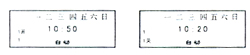
If you need a daily control cycle, please make sure to set the scheduled time (on and off) to the full display state of the week. As shown in the picture:
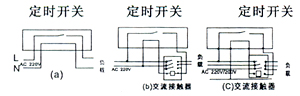
wiring diagram
Product execution standard: GB14048.3-93
Precautions
If the display screen shows weakening, please replace the battery; If the setting content disappears, it needs to be reset.
Please do not repair, disassemble or modify this product by yourself.
Do not let this product come into contact with oil or water.
This product only requires one 1.5V battery for power supply (front mounted, easy to replace), and the empty space of the other battery is reserved for battery replacement, which can prevent power loss and program loss.
 Related Products:
 low-voltage circuit breaker low-voltage contactor Low voltage transformer relay Counter | timer
  timer length meter Measuring device Time-controlled switch
  electronic counter Electromagnetic counter mechanical counter Tiring timer street light controller Programmable controller Low-voltage fuse starter electromagnet resistor Low-voltage arrester power capacitor Low voltage reactor dual power switch Low voltage isolator changeover switch Master Electrical Appliance terminal block plug socket electromagnetic chuck Electrotechnical equipment lighting distribution box Low voltage protector Electric cabinet door lock handle Building electrical appliances
 Home|Quality Commitment|Ordering|Payment method|product delivery|support|Disclaimer|Contact Us
Copyright®2011 www.91way.com Copyright.
Phone:+86-21-66770508 +86-13916500500 Fax:+86-21-66108310
Email:91way@163.com Wechat:40606422
沪ICP备2021005791号  沪公网安备31010702003255号

