
 Your location:Home → High voltage electrical appliances → Electric display device → live display → DXN-Q type indoor high-voltage live display device
 |
Product name: | DXN-Q type indoor high-voltage live display device | |||||
| specification: |   Zoom in on the image Zoom in on the image |
||||||
| Category: | High voltage electrical appliances -- live display | ||||||
| |
Price: | factory price | |||||
| Brand: | |||||||
| Place of Origin: | China | ||||||
| |
Available Quantity: | batch | |||||
| delivery cycle: | Spot goods (or inquire by telephone) | ||||||
 |
|
||||||
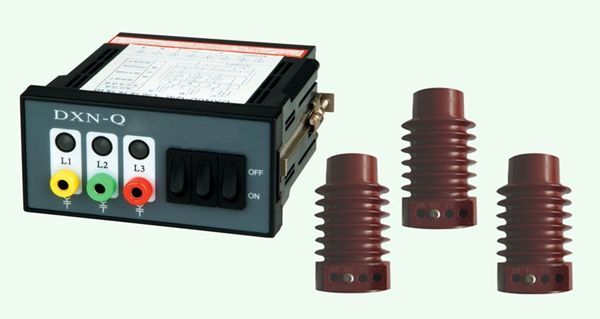
DXN (GSN) T/Q indoor high-voltage live display (hereinafter referred to as the display) is suitable for indoor high-voltage electrical equipment with AC 50Hz and rated voltage of 10kV~35kV, used to display the live status of high-voltage lines. DXN (GSN) - can simultaneously lock high-voltage electrical equipment to prevent electrical misoperation and accidental entry into live intervals.
The display, combined with the high-voltage live sensor, forms a high-voltage live display device that meets the comprehensive requirements of the technical specifications of DL/T538-93 "Technical Conditions for High Voltage Live Display Devices" and DL740-2000 "Capacitive Testers".
Technical parameters of DXN-Q indoor high-voltage live display device
1. Live display
Display DXN-T/Q provides a display of the live status of high-voltage lines in switchgear. A monitor with button function displays the live status of the high-voltage circuit of the electrical equipment when the button is pressed, and the button is reset after the test is completed.
2. Electrical locking
The DXN-Q monitor provides electrical lockout functionality. When the high voltage lines of electrical equipment are energized, the display will control the relay or electromagnetic lock to lock the grounding switch or electrical interval of the high voltage electrified equipment. Only when the high voltage lines of the electrical equipment are not energized and the display has auxiliary power supply, electrical unlocking will be provided.
3. Electrical/Nuclear Phase Testing
The electrical/phase verification port on the monitor provides an external detection port, which needs to be used in conjunction with the electrical/phase verification device DXN-C.
Insert the voltage tester/phase detector into the grounding port and other phase sequence ports of the voltage tester. If there is a display, it indicates that the test phase sequence is live.
The phase tester/phase detector is inserted into the same phase sequence at the testing end of two switch devices. If it does not display, it indicates that the tested phase sequence is the same.
Installation and Usage
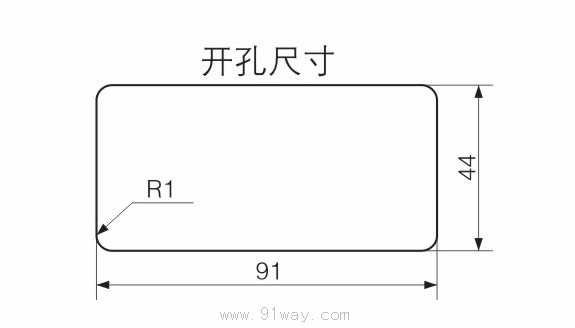
The monitor is suitable for installation on the switchgear panel, and the wiring should be connected according to the schematic diagram. The protective cables connected to the monitor are respectively connected to the sensor voltage divider terminal and the corresponding monitor wiring terminal, and the grounding wire must be reliably grounded.
installation dimensions
DXN-Q indoor high-voltage live display device
 Related Products:
 high-voltage circuit breaker HV isolation switch High voltage load switch
  HV grounding switch Vacuum Contactor Switch high-voltage transformer High-voltage fuse High voltage reactor High-voltage arrester High voltage capacitor discharge coil Handcart series High voltage insulator HV dual power supply High voltage protector High voltage relay High voltage starter High-voltage wall bushing Electric display device electromagnetic lock locking device live display
  High voltage sensor Discharge counting monitoring
 Home|Quality Commitment|Ordering|Payment method|product delivery|support|Disclaimer|Contact Us
Copyright®2011 www.91way.com Copyright.
Phone:+86-21-66770508 +86-13916500500 Fax:+86-21-66108310
Email:91way@163.com Wechat:40606422
沪ICP备2021005791号  沪公网安备31010702003255号

